Team/Key Based Logging
Overview
Allow each key/team to use their own Langfuse Project / custom callbacks. This enables granular control over logging and compliance requirements.
Example Use Cases:
Team 1 -> Logs to Langfuse Project 1
Team 2 -> Logs to Langfuse Project 2
Team 3 -> Disabled Logging (for GDPR compliance)
Supported Logging Integrations
langfusegcs_bucketlangsmitharize
[BETA] Team Logging
✨ This is an Enterprise only feature Get Started with Enterprise here
UI Usage
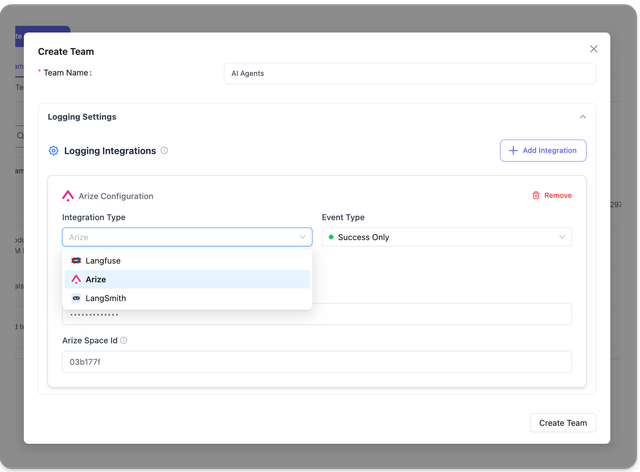
- Create a Team with Logging Settings
Create a team called "AI Agents"
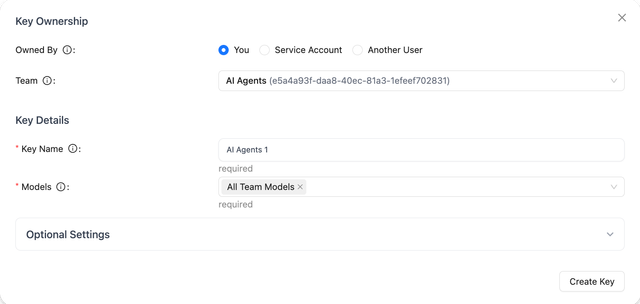
- Create a Key for the Team
We will create a key for the team "AI Agents". The team logging settings will be used for all keys created for the team.
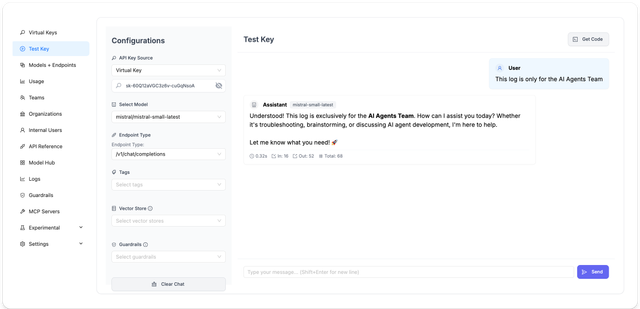
- Make a test LLM API Request
Use the new key to make a test LLM API Request, we expect to see the logs on your logging provider configured in step 1.
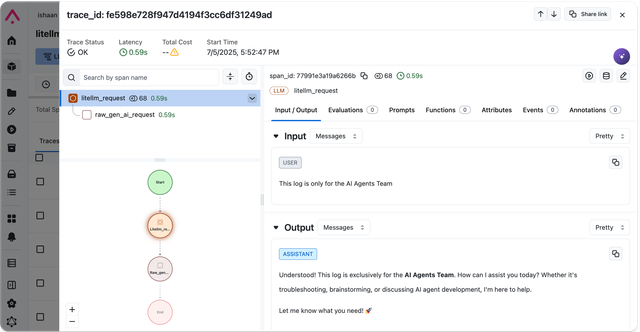
- Check Logs on your Logging Provider
Navigate to your configured logging provider and check if you received the logs from step 2.
API Usage
Set Callbacks Per Team
1. Set callback for team
We make a request to POST /team/{team_id}/callback to add a callback for
curl -X POST 'http:/localhost:4000/team/dbe2f686-a686-4896-864a-4c3924458709/callback' \
-H 'Content-Type: application/json' \
-H 'Authorization: Bearer sk-1234' \
-d '{
  "callback_name": "langfuse",
  "callback_type": "success",
  "callback_vars": {
    "langfuse_public_key": "pk",
    "langfuse_secret_key": "sk_",
    "langfuse_host": "https://cloud.langfuse.com"
    }

}'
Supported Values
| Field | Supported Values | Notes |
|---|---|---|
callback_name | "langfuse", "gcs_bucket" | Currently only supports "langfuse", "gcs_bucket" |
callback_type | "success", "failure", "success_and_failure" | |
callback_vars | dict of callback settings | |
langfuse_public_key | string | Required for Langfuse |
langfuse_secret_key | string | Required for Langfuse |
langfuse_host | string | Optional for Langfuse (defaults to https://cloud.langfuse.com) |
gcs_bucket_name | string | Required for GCS Bucket. Name of your GCS bucket |
gcs_path_service_account | string | Required for GCS Bucket. Path to your service account json |
2. Create key for team
All keys created for team dbe2f686-a686-4896-864a-4c3924458709 will log to langfuse project specified on Step 1. Set callback for team
curl --location 'http://0.0.0.0:4000/key/generate' \
    --header 'Authorization: Bearer sk-1234' \
    --header 'Content-Type: application/json' \
    --data '{
        "team_id": "dbe2f686-a686-4896-864a-4c3924458709"
}'
3. Make /chat/completion request for team
curl -i http://localhost:4000/v1/chat/completions \
  -H "Content-Type: application/json" \
  -H "Authorization: Bearer sk-KbUuE0WNptC0jXapyMmLBA" \
  -d '{
    "model": "gpt-4",
    "messages": [
      {"role": "user", "content": "Hello, Claude gm!"}
    ]
}'
Expect this to be logged on the langfuse project specified on Step 1. Set callback for team
Disable Logging for a Team
To disable logging for a specific team, you can use the following endpoint:
POST /team/{team_id}/disable_logging
This endpoint removes all success and failure callbacks for the specified team, effectively disabling logging.
Step 1. Disable logging for team
curl -X POST 'http://localhost:4000/team/YOUR_TEAM_ID/disable_logging' \
    -H 'Authorization: Bearer YOUR_API_KEY'
Replace YOUR_TEAM_ID with the actual team ID
Response A successful request will return a response similar to this:
{
    "status": "success",
    "message": "Logging disabled for team YOUR_TEAM_ID",
    "data": {
        "team_id": "YOUR_TEAM_ID",
        "success_callbacks": [],
        "failure_callbacks": []
    }
}
Step 2. Test it - /chat/completions
Use a key generated for team = team_id - you should see no logs on your configured success callback (eg. Langfuse)
curl -i http://localhost:4000/v1/chat/completions \
  -H "Content-Type: application/json" \
  -H "Authorization: Bearer sk-KbUuE0WNptC0jXapyMmLBA" \
  -d '{
    "model": "gpt-4",
    "messages": [
      {"role": "user", "content": "Hello, Claude gm!"}
    ]
}'
Debugging / Troubleshooting
- Check active callbacks for team using
GET /team/{team_id}/callback
Use this to check what success/failure callbacks are active for team=team_id
curl -X GET 'http://localhost:4000/team/dbe2f686-a686-4896-864a-4c3924458709/callback' \
        -H 'Authorization: Bearer sk-1234'
Team Logging Endpoints
POST /team/{team_id}/callbackAdd a success/failure callback to a teamGET /team/{team_id}/callback- Get the success/failure callbacks and variables for a team
Team Logging - config.yaml
Turn on/off logging and caching for a specific team id.
Example:
This config would send langfuse logs to 2 different langfuse projects, based on the team id
litellm_settings:
  default_team_settings:
    - team_id: "dbe2f686-a686-4896-864a-4c3924458709"
      success_callback: ["langfuse"]
      langfuse_public_key: os.environ/LANGFUSE_PUB_KEY_1 # Project 1
      langfuse_secret: os.environ/LANGFUSE_PRIVATE_KEY_1 # Project 1
    - team_id: "06ed1e01-3fa7-4b9e-95bc-f2e59b74f3a8"
      success_callback: ["langfuse"]
      langfuse_public_key: os.environ/LANGFUSE_PUB_KEY_2 # Project 2
      langfuse_secret: os.environ/LANGFUSE_SECRET_2 # Project 2
Now, when you generate keys for this team-id
curl -X POST 'http://0.0.0.0:4000/key/generate' \
-H 'Authorization: Bearer sk-1234' \
-H 'Content-Type: application/json' \
-d '{"team_id": "06ed1e01-3fa7-4b9e-95bc-f2e59b74f3a8"}'
All requests made with these keys will log data to their team-specific logging.
[BETA] Key Based Logging
Use the /key/generate or /key/update endpoints to add logging callbacks to a specific key.
✨ This is an Enterprise only feature Get Started with Enterprise here
How key based logging works:
- If Key has no callbacks configured, it will use the default callbacks specified in the config.yaml file
- If Key has callbacks configured, it will use the callbacks specified in the key
UI Usage
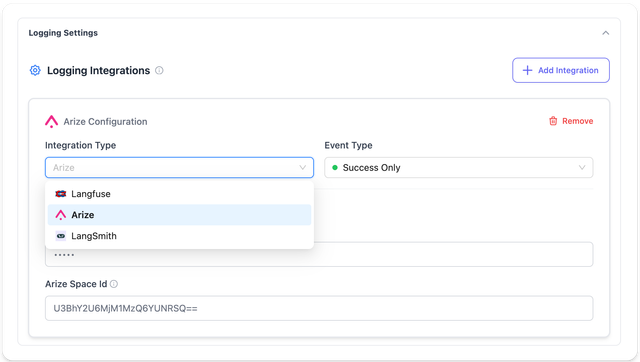
- Create a Key with Logging Settings
When creating a key, you can configure the specific logging settings for the key. These logging settings will be used for all requests made with this key.
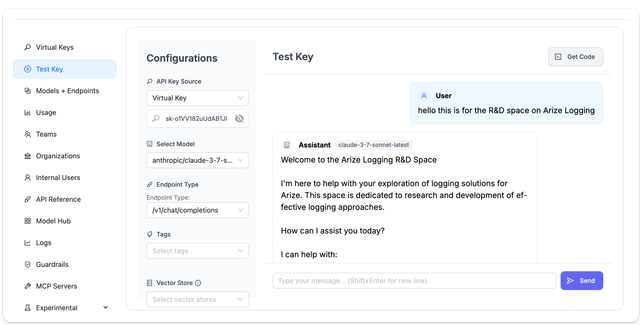
- Make a test LLM API Request
Use the new key to make a test LLM API Request, we expect to see the logs on your logging provider configured in step 1.
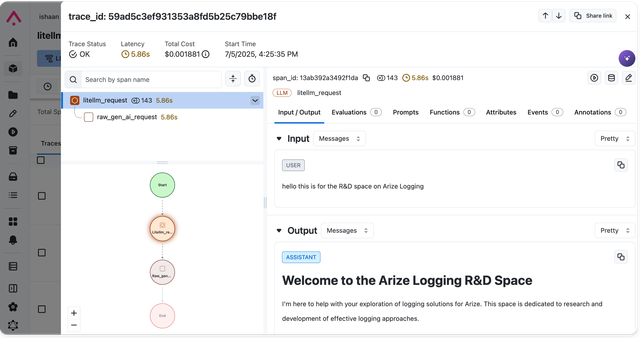
- Check Logs on your Logging Provider
Navigate to your configured logging provider and check if you received the logs from step 2.
API Usage
- Langfuse
- GCS Bucket
- Langsmith
curl -X POST 'http://0.0.0.0:4000/key/generate' \
-H 'Authorization: Bearer sk-1234' \
-H 'Content-Type: application/json' \
-d '{
    "metadata": {
        "logging": [{
            "callback_name": "langfuse", # "otel", "gcs_bucket"
            "callback_type": "success", # "success", "failure", "success_and_failure"
            "callback_vars": {
                "langfuse_public_key": "os.environ/LANGFUSE_PUBLIC_KEY", # [RECOMMENDED] reference key in proxy environment
                "langfuse_secret_key": "os.environ/LANGFUSE_SECRET_KEY", # [RECOMMENDED] reference key in proxy environment
                "langfuse_host": "https://cloud.langfuse.com"
            }
        }]
    }
}'
- Create Virtual Key to log to a specific GCS Bucket
Set GCS_SERVICE_ACCOUNT in your environment to the path of the service account json
export GCS_SERVICE_ACCOUNT=/path/to/service-account.json # GCS_SERVICE_ACCOUNT=/Users/ishaanjaffer/Downloads/adroit-crow-413218-a956eef1a2a8.json
curl -X POST 'http://0.0.0.0:4000/key/generate' \
-H 'Authorization: Bearer sk-1234' \
-H 'Content-Type: application/json' \
-d '{
    "metadata": {
        "logging": [{
            "callback_name": "gcs_bucket", # "otel", "gcs_bucket"
            "callback_type": "success", # "success", "failure", "success_and_failure"
            "callback_vars": {
                "gcs_bucket_name": "my-gcs-bucket", # Name of your GCS Bucket to log to
                "gcs_path_service_account": "os.environ/GCS_SERVICE_ACCOUNT" # environ variable for this service account
            }
        }]
    }
}'
- Test it -
/chat/completionsrequest
Use the virtual key from step 3 to make a /chat/completions request
You should see your logs on GCS Bucket on a successful request
curl -i http://localhost:4000/v1/chat/completions \
  -H "Content-Type: application/json" \
  -H "Authorization: Bearer sk-Fxq5XSyWKeXDKfPdqXZhPg" \
  -d '{
    "model": "fake-openai-endpoint",
    "messages": [
      {"role": "user", "content": "Hello, Claude"}
    ],
    "user": "hello",
  }'
- Create Virtual Key to log to a specific Langsmith Project
curl -X POST 'http://0.0.0.0:4000/key/generate' \
-H 'Authorization: Bearer sk-1234' \
-H 'Content-Type: application/json' \
-d '{
    "metadata": {
        "logging": [{
            "callback_name": "langsmith", # "otel", "gcs_bucket"
            "callback_type": "success", # "success", "failure", "success_and_failure"
            "callback_vars": {
                "langsmith_api_key": "os.environ/LANGSMITH_API_KEY", # API Key for Langsmith logging
                "langsmith_project": "pr-brief-resemblance-72", # project name on langsmith
                "langsmith_base_url": "https://api.smith.langchain.com"
            }
        }]
    }
}'
- Test it -
/chat/completionsrequest
Use the virtual key from step 3 to make a /chat/completions request
You should see your logs on your Langsmith project on a successful request
curl -i http://localhost:4000/v1/chat/completions \
  -H "Content-Type: application/json" \
  -H "Authorization: Bearer sk-Fxq5XSyWKeXDKfPdqXZhPg" \
  -d '{
    "model": "fake-openai-endpoint",
    "messages": [
      {"role": "user", "content": "Hello, Claude"}
    ],
    "user": "hello",
  }'
Help us improve this feature, by filing a ticket here
Check if key callbacks are configured correctly /key/health
Call /key/health with the key to check if the callback settings are configured correctly
Pass the key in the request header
curl -X POST "http://localhost:4000/key/health" \
  -H "Authorization: Bearer <your-key>" \
  -H "Content-Type: application/json"
- Response when key is configured correctly
- Response when key is configured incorrectly
Response when logging callbacks are setup correctly:
A key is healthy when the logging callbacks are setup correctly.
{
  "key": "healthy",
  "logging_callbacks": {
    "callbacks": [
      "gcs_bucket"
    ],
    "status": "healthy",
    "details": "No logger exceptions triggered, system is healthy. Manually check if logs were sent to ['gcs_bucket']"
  }
}
Response when logging callbacks are not setup correctly
A key is unhealthy when the logging callbacks are not setup correctly.
{
  "key": "unhealthy",
  "logging_callbacks": {
    "callbacks": [
      "gcs_bucket"
    ],
    "status": "unhealthy",
    "details": "Logger exceptions triggered, system is unhealthy: Failed to load vertex credentials. Check to see if credentials containing partial/invalid information."
  }
}
Disable/Enable Message redaction
Use this to enable prompt logging for specific keys when you have globally disabled it
Example config.yaml with globally disabled prompt logging (message redaction)
model_list:
 - model_name: gpt-4o
    litellm_params:
      model: gpt-4o
litellm_settings:
  callbacks: ["datadog"]
  turn_off_message_logging: True # 👈 Globally logging prompt / response is disabled
Enable prompt logging for key
Set turn_off_message_logging to false for the key you want to enable prompt logging for. This will override the global turn_off_message_logging setting.
curl -X POST 'http://0.0.0.0:4000/key/generate' \
-H 'Authorization: Bearer sk-1234' \
-H 'Content-Type: application/json' \
-d '{
    "metadata": {
        "logging": [{
            "callback_name": "datadog",
            "callback_vars": {
                "turn_off_message_logging": false # 👈 Enable prompt logging
            }
        }]
    }
}'
Response from /key/generate
{
    "key_alias": null,
    "key": "sk-9v6I-jf9-eYtg_PwM8OKgQ",
    "metadata": {
        "logging": [
            {
                "callback_name": "datadog",
                "callback_vars": {
                    "turn_off_message_logging": false
                }
            }
        ]
    },
    "token_id": "a53a33db8c3cf832ceb28565dbb034f19f0acd69ee7f03b7bf6752f9f804081e"
}
Use key for /chat/completions request
This key will log the prompt to the callback specified in the request
curl -i http://localhost:4000/v1/chat/completions \
  -H "Content-Type: application/json" \
  -H "Authorization: Bearer sk-9v6I-jf9-eYtg_PwM8OKgQ" \
  -d '{
    "model": "gpt-4o",
    "messages": [
      {"role": "user", "content": "hi my name is ishaan what key alias is this"}
    ]
  }'